Comparison guide
Block gambling sites on your phone: every route, compared
GAMSTOP, blocking software, a bank card block and your phone's own settings each stop different things, for different lengths of time. Here is what each one actually covers, sourced from its own documentation, plus a practical order to set them up in.
What "blocking" actually covers on a phone
A phone is not one door. It carries an operator account you log into, an app installed on it, a mobile browser that can reach any site the app doesn't cover, and a bank card that can pay for all three. Closing one of those does not close the others, which is why a single search for "how to block gambling on my phone" tends to surface five different products that each solve a different piece of the problem.
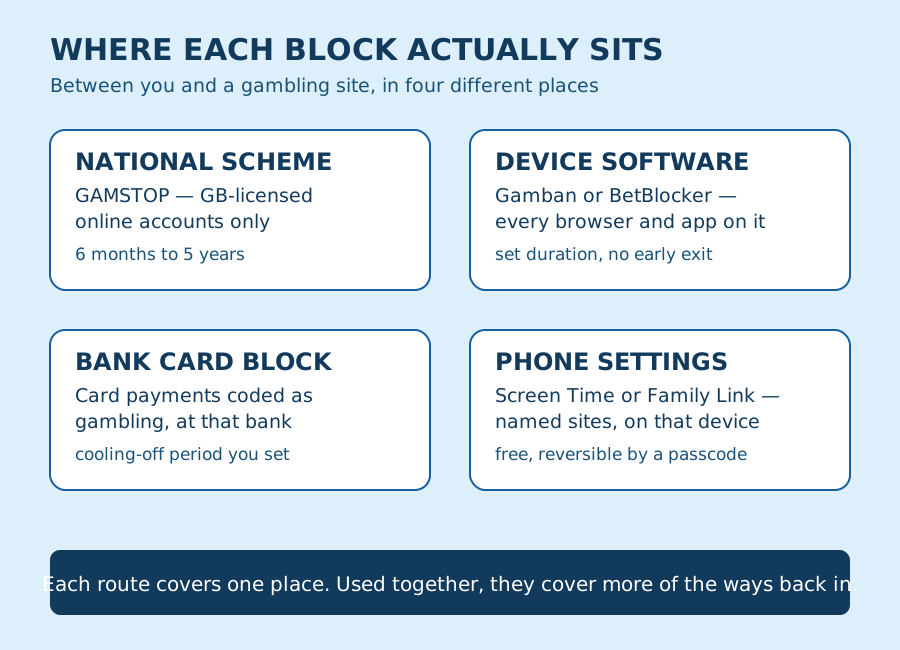
It helps to treat "blocking gambling on your phone" as four smaller, separate tasks: stopping the account, stopping the app, stopping the browser, and stopping the payment. Nobody solves all four with one setting, and no provider claims to. The rest of this guide goes through each route in turn, using what each provider's own documentation says about its coverage, before comparing them side by side.
GAMSTOP: the national online self-exclusion scheme
GAMSTOP is a free self-exclusion service. Once you register, its current information states that you become blocked from accessing online gambling accounts with companies licensed in Great Britain. That is the scope: online accounts, with operators holding a GB licence.
You choose an exclusion period of six months, one year or five years, with an option for automatic renewal. GAMSTOP is explicit that registration cannot be cancelled during the period you chose, and that the exclusion stays in place after that period ends unless you actively contact GAMSTOP to have it removed. Neither of those is a bug; both are the point of a scheme designed to survive a moment when you might want to talk yourself out of it.
What GAMSTOP does not do is also worth stating plainly: it does not reach a betting shop or arcade you visit in person, and it does not reach a site operating without a GB licence. If your gambling happens somewhere GAMSTOP's scope does not extend to, this scheme alone will not close that door.
Sources: GAMSTOP: How it works.
Blocking software: Gamban and BetBlocker
Where GAMSTOP acts on an account, blocking software acts on a device. Two names come up most often, and they work differently enough to be worth separating.
Gamban is a paid subscription, with a 7-day free trial for new users. Its own site describes blocking tens of thousands of gambling websites and apps worldwide, with one licence covering every device you own across the major platforms — iOS, Android, Mac and Windows. Its homepage does not publish exact pricing or cancellation steps, so check its own pricing and support pages before you commit rather than relying on a summary here.
BetBlocker is free, permanently, and run by a charity registered in Scotland, funded through grants and donations. It covers Windows, Mac, Linux, Android, iOS, Fire OS and AppGallery, on an unlimited number of devices. At setup you choose a duration — from one day up to five years — or use its calendar feature to schedule recurring blocked windows, for example every evening. BetBlocker cannot be turned off early: once a restriction begins it runs its full course, and a block of two months or longer carries an extra seven-day cooling-off period before it lifts.
GamCare's own list of blocking software also names Gamblock and Netnanny as further options, without recommending one over the others, and encourages checking each product's current detail yourself before choosing. GamCare frames all of them the same way: useful on their own, more useful alongside GAMSTOP, a bank block and a person to talk to.
Sources: Gamban, BetBlocker, GamCare: Blocking software.
Ask your bank to block the card payment
A bank block sits at a different point again: the payment, not the account or the device. Monzo, used here as one documented example rather than a claim that every bank works identically, explains that it identifies gambling transactions by the merchant category code attached to a payment. When a payment carries that code, it is blocked; if a merchant has not been coded as gambling, Monzo says it cannot stop that payment in real time, though it can add the merchant to its block list afterwards.
Monzo's block covers card payments only — a bank transfer to the same operator is a separate conversation with your bank. Setting the block up also means choosing a cooling-off period, from two days up to a year, during which it cannot be turned off; only once that period ends can you switch it off. A separate "spending block" targeting one named merchant, by contrast, carries no cooling-off period and can be removed at any time — a different tool for a different purpose.
The useful action is asking your own bank, through its app or an official support line, exactly what it blocks, which payment types are covered, and how long any cooling-off period runs — rather than assuming every bank's controls match another bank's.
Sources: Monzo: How blocks work.
Your phone's own settings can block a named site
Before installing anything new, it is worth knowing what your phone can already do. Apple's Screen Time has a general filter for adult content, but a separate section — Apps & Websites — lets whoever holds the Screen Time passcode manually block one specific website or app outright, distinct from that general filter. It is protected by a passcode, so it can be undone by whoever knows it.
On Android, Google's Family Link offers an equivalent under Chrome settings: "Approved sites and Blocked sites" lets a supervisor add a specific website address to a block list, which then overrides other browsing settings on that device. Family Link is built as a parental-control feature and generally expects the device to be set up as a supervised account, which is a heavier step than Apple's version if the phone is your own rather than a child's.
Neither feature was designed with gambling in mind specifically — they block a named site or app, not a category — and neither reaches any other device you own. Used well, this is a free, immediate layer on top of the routes above, not a replacement for them.
Sources: Apple Support: Screen Time, Google: Chrome & your child's Google Account.
Every route, compared
Put side by side, using only what each provider states about its own service, the differences are clearer than any single page makes them look:
| Route | What it blocks | What it doesn't reach | How long it lasts | How to reverse it |
|---|---|---|---|---|
| GAMSTOP | Registration and use of online accounts with GB-licensed operators | Land-based premises; sites without a GB licence; other people's accounts | 6 months to 5 years, chosen at sign-up, with optional auto-renewal | Cannot cancel during the period; stays active afterwards until you request removal |
| Gamban | Thousands of gambling sites and apps, on every major device platform under one licence | Payment methods; anything Gamban has not catalogued | Ongoing paid subscription, after a 7-day free trial | Cancel through Gamban's own account or support channel |
| BetBlocker | The same broad reach as Gamban, free, on unlimited devices, most major platforms | Payment methods; platforms outside its supported list | 1 day to 5 years, or a recurring schedule, chosen at setup | Cannot be lifted early; a 7-day cooling-off period applies before blocks of 2+ months end |
| Bank card block (e.g. Monzo) | Card payments coded as gambling merchants, at that one bank | Bank transfers and other payment types; merchants without a gambling code | A cooling-off period you choose, from 2 days to a year | Switches off automatically once your chosen cooling-off period ends |
| Phone settings (Screen Time / Family Link) | One named site or app, on that specific device | Every other device you own; anyone holding the passcode or parent login | Until whoever holds the passcode changes it | Removed via the Screen Time passcode or the Family Link account |
Set them up in this order
- Decide what you are actually trying to close first — the account, the app, the browser or the money — because each route above answers a different one of those, not all four at once.
- Register with GAMSTOP if online play through GB-licensed operators is the main route back in. Choose the longest period you feel confident about, since you cannot shorten it once it is set.
- Install BetBlocker, free, or Gamban, paid, on every device you actually use — a phone, a tablet and a laptop, not only the one in front of you right now.
- Contact your bank through its app or official support line and ask specifically what its gambling block covers and how long its cooling-off period runs before you commit to one.
- On top of that, use your phone's own Screen Time or Family Link settings to add the exact sites or apps you know you use, as a layer that needs a passcode to undo.
- Tell one person what you have set up and why — not so they police it, but so a route back in is not a decision made alone in a difficult moment.
- Write down what you registered, when, and for how long, somewhere you will find it again. Several of these routes cannot be reversed early, and knowing the date matters more than remembering every detail.
No block is a guarantee — and that's fine
None of the five routes above, alone or stacked together, can promise that gambling stops. A technical measure closes a door; it cannot account for a new account opened elsewhere, a friend's device, or cash. Our note on limits goes into why a boundary and a guarantee are different things, and why that difference does not make the boundary pointless.
What a block reliably does is buy time and add friction at a moment when either one is useful. That is a real, measurable effect, even though it is a smaller claim than "solved."
If you'd rather talk to someone first
None of the above needs to happen before you ask for support, and none of it replaces a conversation if the gambling itself is the harder problem to address. GamCare's National Gambling Helpline is available on 0808 8020 133, 24 hours a day, seven days a week, with a live-chat option on its site for anyone who would rather not speak. The NHS also describes self-referral routes to specialist gambling clinics and support for people affected by someone else's gambling, not only the person gambling themselves.
You can set up a block today and still call tomorrow, or call first and sort out the technical side afterwards. Our note on making space for a pause is a shorter, calmer starting point if a full comparison like this one feels like more than you need right now.
Sources: GamCare: Blocking software, NHS: Help for problems with gambling.
Support sources
- GAMSTOP: How it works — accessed 19 September 2026
- Gamban — accessed 19 September 2026
- BetBlocker — accessed 19 September 2026
- GamCare: Blocking software — accessed 19 September 2026
- GamCare: Signs of gambling harm — accessed 19 September 2026
- Monzo: How blocks work — accessed 19 September 2026
- Apple Support: Screen Time — accessed 19 September 2026
- Google: Chrome & your child's Google Account — accessed 19 September 2026
- NHS: Help for problems with gambling — accessed 19 September 2026